
01
Start with the inquiry, not a disconnected spreadsheet
A shopper asking about a specific used sedan, a buyer comparing two trims of a new truck, and an owner asking for a trade appraisal do not need the same response. They do need a clear owner and a record of what they asked. Shiftix Cloud helps teams organize leads and opportunities, record the source of each inquiry, and keep customer conversations attached to the work that follows.
Keeping vehicle interest visible matters. An inquiry about a specific stock unit should not become a generic name with no buying context. The team can keep notes on the vehicle, trade details, and timing as the conversation develops. Not every source arrives with complete data, so staff should confirm details with the customer rather than assume an imported field is correct.
02
Keep every opportunity moving
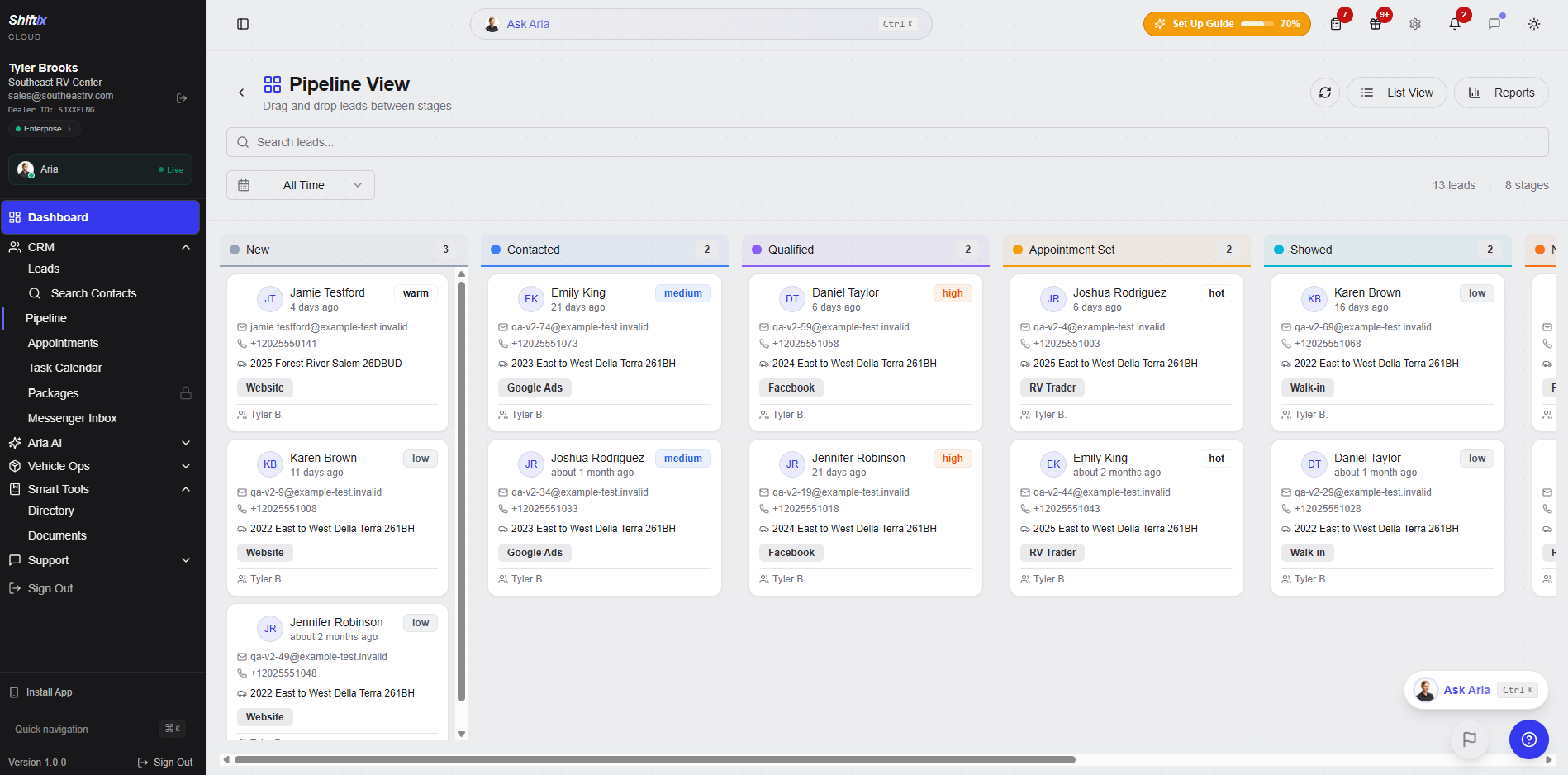
Automotive shoppers often contact several stores at once, and many conversations stall after the first reply. A pipeline with stages, tasks, and due dates gives the assigned rep a reason to reconnect and a record of what was said last time. Managers can see which opportunities have a next step scheduled and which have none.
The CRM supports staff judgment. It does not choose a vehicle or set pricing. It does not guarantee that a shopper will return.
03
Make responsibility visible across stores
Sales, BDC, management, finance, and service may all talk with the same customer, and multi-location dealers add another layer. A shared pipeline and assigned tasks show who owns the current opportunity and what remains open. When an employee hands off a conversation, the next person has a starting point instead of asking the customer to repeat everything.
Appointments belong in the same workflow. A test drive or appraisal is a commitment someone needs to prepare for, confirm, and follow through on. Keeping the appointment next to the lead and its communication history helps a manager judge whether an opportunity is progressing.
04
Coordinate response and review-ready assistance
Supported customer messages can be handled through the Unified Customer Inbox alongside the CRM record. A rep can read the inquiry, check ownership, and respond with context. Notifications and routing can help direct attention to new work, but delivery and timing depend on the configured channels and the team operating them. Shiftix does not promise a reply within a fixed number of seconds.
The Aria AI assistant can help summarize context and prepare a follow-up draft. The employee reviews, changes, and approves customer-facing messages. For an automotive store that matters: a question about availability, a payment, or a trade value may need a person to confirm the facts before replying.
05
Keep the relationship going after the sale
Vehicle ownership brings return visits for service, equity conversations, and eventually another vehicle. Recording relevant history and planning a follow-up gives the store a way to keep that relationship visible. Service staff can see customer-facing commitments without treating the CRM as the repair-order system. Campaigns and reminders should be configured around the dealership's own consent, timing, and business rules.
06
Know where the CRM ends and your DMS begins
Your DMS remains the system of record for the operational and accounting work it supports. CRM records help organize prospects, communications, appointments, and follow-through. If DMS context is needed, the exact connection has to be evaluated for your provider, available access, permitted fields, and implementation scope. A named system in a general catalog does not mean a live, two-way sync is available for your store.
Read the automotive DMS integration guide for questions to bring to a connection review, or return to the automotive dealer software overview to see how lead response, Shiftix CRM, and your DMS fit together. To evaluate the product, request a walkthrough using a representative vehicle inquiry and ask to see assignment, follow-up, and a handoff between team members. Discuss pricing and setup for your locations and users on the pricing page.
A trade-in conversation across two people
A hypothetical scenario to show the workflow. Names, units and steps are not customer data and do not describe a specific integration.
- 1
Inquiry
A shopper submits a form about a used pickup and mentions a trade. Shiftix records the source and assigns a BDC rep.
- 2
Appointment
The BDC rep books an appraisal and test drive, kept next to the lead.
- 3
Handoff
A salesperson takes over, reads the history, and does not ask the customer to repeat the trade details.
- 4
Boundary
The appraisal, deal and paperwork are recorded in the DMS. Shiftix keeps the follow-up.
What to see in a walkthrough
Bring a representative inquiry and ask to see each of these with your own team's workflow.
- A new vehicle inquiry arriving with its source recorded and an owner assigned.
- Notes on unit interest, trade and timing added to the record.
- A follow-up task with a due date, and how a manager sees opportunities with no next step.
- An appointment kept next to the lead and its conversation history.
- A handoff from one team member to another without the customer repeating themselves.
- An Aria draft reviewed and edited by the employee before sending.
- Which details stay in your DMS, and which would need a confirmed connection.